

 Social Media is scattered around the whole diversified World Wide Web. Every business has a tendency to dig into it and leverage the true power of this emerging trend. There are many social media sites out there, few general and broad in scope covering almost every aspect of social cloud. Others focused on a specific niche area. This is your little task as to find out the one's which suits your business and social needs well. So these top 20 social media resources contain both type of sites and it is recommended that you visit each of them, leverage your business and harness the potential of becoming social with your customers base. The data has been collected from various platforms, tools and utilities and the factors to rate were like page views, rankings and average growth of a website over a specific period of time etc. Remember always that the days have gone past when only performing few SEO activities were sufficient enough to rank a site higher in search engines, it is now becoming more important to realize that social media optimization is going to play a major role in 2010, as it did to some extent in 2009.
Showing posts with label Social Media. Show all posts
Showing posts with label Social Media. Show all posts
Saturday, April 23, 2011
Top 20 Social Media Resources
Social Media is scattered around the whole diversified World Wide Web. Every business has a tendency to dig into it and leverage the true power of this emerging trend. There are many social media sites out there, few general and broad in scope covering almost every aspect of social cloud. Others focused on a specific niche area. This is your little task as to find out the one's which suits your business and social needs well. So these top 20 social media resources contain both type of sites and it is recommended that you visit each of them, leverage your business and harness the potential of becoming social with your customers base. The data has been collected from various platforms, tools and utilities and the factors to rate were like page views, rankings and average growth of a website over a specific period of time etc. Remember always that the days have gone past when only performing few SEO activities were sufficient enough to rank a site higher in search engines, it is now becoming more important to realize that social media optimization is going to play a major role in 2010, as it did to some extent in 2009.Delete, Uninstall All Facebook Applications from Profile, Account
If you have been using facebook for over 6 months you might have 50+ applications installed in your facebook account. This is includes the ones you trust and some of them which get installed unknowingly while "allowing" it to use your profile data to calculate your top 5 friends.
Remove Unwanted Applications from Your Facebook Profile
By default, apps have access to your friends list and any information you choose to share with everyone. By installing the you have authorized these apps to interact with your Facebook account in any way they want.
So its not suitable to keep untrusted apps installed to your profile. Here is how you can remove them.
Step 1 : Click on "Account" at top right corner and click on "Privacy Settings".

Step 2 : On the "Choose Your Privacy Settings" page click on the Edit your settings link under "Apps and Websites".

Step 3 : Click on Edit Settings button.

You can also use this link to directly access the apps settings page
Step 4 : On this page you’ll see all the apps that are installed on your facebook profile. Click on the small [x] button to remove them.

Click "Remove" to uninstall the application. Similarly do the same with the rest of them to remove all unwanted facebook applications.
Saturday, April 16, 2011
Blogger Blogspot SEO Tips and Tricks
 Want to improve SEO on a Blogspot Blogger blog? This tutorial discusses how bloggers can optimize their blog using SEO techniques to improve indexing of their Blogger Blogspot blog and achieve a better ranking in search engine results.
 In this article I will be discussing the following Blogger help tips for SEO:
- Adding Your Blogger Blog to Major Search Engines
- Optimizing Blogger Post Titles
- Utilising Meta Keywords and a Meta Description
- Using Keywords in Alt Tags and Image Titles
- Using Target Keywords in Your Post Content
- Optimizing Blogger Title Tags
- Optimizing Your Blogger Permalinks
- Making Use of HTML Heading Tags Within Posts and Post Titles
- Adding Breadcrumb Navigation to your Blogger Blog
Get Your Blog Listed by Major Search Engines
Getting listed in the major search engines is a must if you want to get traffic from search engines. I have written several in depth articles about how to add a sitemap to major search engines and how to add your blog to Google, Yahoo and MSN so I will not repeat myself. Follow these articles for step by step walkthroughs
Optimize Your Blogger Post Titles
Major search engines lend a lot of weight to titles so it is important that you craft your post titles carefully. To optimize your post titles make them keyword rich and ensure the title clearly explains what the blog post is about. Try to put your keywords at the beginning of your title for best results and avoid repeating your keywords within the title. Avoid long titles as Google only displays about 65 characters in the search results anyway.
Title tags are important if your Blogger blog is to attract traffic and rank in search engine results. On your blog home page the blog title appears between the title tags while on each individual post page it is the name of the article itself. While the title tags themselves are unseen by the visitor to your blog they are read when search engines crawl your blog.
Search engines use title tags to display your post title as a headline in search engine results. Search engines also display a description of the article either by extracting it from the post content usually by picking up the first 150 characters of your post or by reading the meta description of the post if one exists.
Meta descriptions can be crafted for individual posts in Blogger to good effect. Make descriptions unique for each post and ensure they contain your target keywords and keyword phrases to encourage search engines to extract snippets from them. To find out more about adding a meta description to an individual post please see my article Adding Meta Tags to Blogger Blogspot Blog for Better SEO
Add Meta Tags and Blog Description to Blogger
Adding meta keywords and a blog description to your Blogger Blogspot blog can boost your rankings by helping visitors locate your blog using keyword and keyword phrases. To find out the best method of inserting these into your Blogger blog please refer to my article about Adding Meta Tags to Blogger Blogspot Blog for Better SEO
Use Keywords in Alt Tags and Image Titles
Optimize the images used on your blog by making use of the alt tags and image titles. For some tips on SEO and images please refer to 10 Tips to Build Site Traffic for a Blogspot Blog
Use Target Keywords in Your Post Content
 Make sure you know your targeted keywords and use them within your post content. One of the factors in determining rankings is the relevance of the targeted keywords in relationship to the text that appears in the post content.
Change the Order of Post Title and Blog Title for Better SEO
One key change you can make to Blogger that will markedly improve the SEO of your blog is to adjust the title tags.
By default Blogger title tags are not optimized for search engines. The name of the blog appears before the name of the article which is not search engine friendly. Since search engines read left to right and give preference to what appears first having your blog name display before your post title is significant. To improve SEO it pays to adjust the order of title tags so that the your post title appears first:
Blog Title | Post Title
to
Post Title | Blog Title
To find out how to adjust the title tags of a Blogger Blogspot blog please refer to my article Adjust Blogger Title Tags to Improve SEO
Optimize Your Blogger Permalinks
Hand in hand with a title tag is the permanent permalink that is created when a post is published. If the title of the post is more than about 35 characters long you will strike problems with Blogger because it will shorten the title to a 35-40 character permalink. Some very ugly results happen because of this factor. For instance imagine a permalink such as:
http://blogknowhow.blogspot.com/2009/02/how-to-create-improved-permalinks-for.html
A totally useless permalink results because the blogger keyword has been left off. Learn more about crafting titles and working around the limitations of Blogger permalinks in my article How to Create Search Engine Friendly Permalinks

Improve SEO by Making Use of Headings for Post Titles
Heading tags are important for optimal SEO. Most Blogger.com templates use html header tags sized <h2> or <h3> for the post title. In the past major search engines like Google gave precedence to tags with <h1> ahead of anything else but how important <h1> tags are today is less certain. You could tweak the heading size of your post title if you wish however take care to ensure the look of your template isn't compromised. A bigger font will result and this may mean other parts of your blog will need to be adjusted to compensate. To find out what size your blog title is look for the following lines in your template.
<b:if cond='data:post.title'>
<h3 class='post-title entry-title'>
<b:if cond='data:post.link'>
<a expr:href='data:post.link'>&t/a>
<b:else/>
<b:if cond='data:post.url'>
<a expr:href='data:post.url'></a>
<b:else/>
<data:post.title/>
</b:if>
</b:if>
</h3>
</b:if>
As can be seen this template blog title is in <h3>. To change the size of the tags just substitute the appropriate header tag where <h3> appears
Improve SEO By Making Use of Heading Tags Within Posts
Heading tags can be used to good effect in your posts. Make sure you have only one <h1> heading per page if you have one at all and reserve this for your post title. Make use of <h2> and <h3> headings throughout your post to emphasize key points and targeted keywords. Major search engines do take notice of <h2> and <h3> headings when crawling your blog. To add emphasis to a heading within your blog simply enclose the heading in <h3> tags.
Add Breadcrumb Navigation to your Blogger Blog
There is a hack that can be used to add breadcrumb navigation to a Blogger Blogspot blog. Adding breadcrumb navigation can boost your SEO of your blog as well as improving how readers get around.

A breadcrumb provides text-based navigation by displaying the visitor's location within a blog. A breadcrumb provides shortcuts to enable visitors to quickly get around your blog and jump from one part of your blog to another. For example a breadcrumb for a post about meta tags would be Home > Meta Tags >Add Meta Tags to Blogger for Better SEO. An anchor text such as 'meta tags' tells search engines about the subject of the linked page. Search engines view a breadcrumb with a text link to relevant keywords in the post as important.
To find out how to add a breadcrumb navigation to your Blogger Blogspot blog please refer to my article Add Breadcrumb Navigation to a Blogger Blog
This article has focused on providing you with solid Blogger SEO advice, tips and tricks for the Blogspot Blogger. It will help you achieve good SEO results for your blog. Good luck. If you have time let me know about your experiences.
Friday, April 15, 2011
Free Tools and Services for Bloggers Part 4
Tags : Blogger, Blogger Tips, Blogging, Blogging Tips, Blogspot Tips, Social Media, Web Design, Webmaster Tips
 Bloggers do not just write articles! They have to do a lot of things to manage and promote their blogs. These activities range from commenting to finding useful design and software tools. Often such tools are life savers, allowing more time for the business of writing and keeping readers happy. But at the same time, finding perfect tool for a task is difficult and time consuming. So, we searched internet for best free blogging tools and services for bloggers and summed them up in this post. Content:Image Credit: ABContentOnline.comZemanta: Zemanta is a content suggestion tool that searches for related content (articles and pictures) around the web and also suggests tags and links. Zemanta has been one of our favorite plugins...
Feeds:
- Google Reader: Online feed reader to read feeds from favorite blogs.
- Feed Compare: Lets you compare feed numbers with competition. Both new and old Feedburner are supported. Note: You have to give full feed address for new feedburner. e.g. http://feedproxy.google.com/feed-name
- Feedkiller: Merge multiple feeds and read all your favorite blogs in one universal feed.
- FeedIcon20: Lets you generate custom feed icons for your blog/website. Here is an example:
about Feed - ZapTXT: Sends you a notice via RSS, E-Mails or SMS when your favorite website is updated.
- Page2RSS: Lets you create RSS feeds for websites that do not publish feeds. You can then subscribe to created feed and stay updated.

For Hosted Blogs:
- Down Or Not?: Lets you check if a website is down or not.
- DingIt’sUp: Notifies you via SMS, E-Mail or Twitter if your blog/website goes down.
- Sitonomy: Ever wanted to find which tools are used by big guys to power their blogs? This website lets you check the technologies that they use. For example, you can find that ProBlogger uses Google Ad Manager and six statistics counters!
- ServerCheck: Checks if a server is down, the IP of a domain and number of websites hosted on server(useful when deciding host).
HTML:
- Meta Tags Generator: Generates meta tags for your blog which you can paste into your blog’s head section for better SEO.
- IdTabs: Lets you add tabbed widgets to your blog. Note: You need jQuery before adding it.
- Drop Down Menu Generator: Lets you create a drop down selection box for your site. Copy the code to your blog and you are done.
- SikBox: Lets you make a live search box for your site. It is extremely lightweight. Just test the sample menu on their homepage by entering your blog address. However, this tool does not work for hosted blogs ( I tried Blogspot but it did not work, however m.bloggingwithsuccess.net worked out fine.)
- Headline Animator: Displays animated recent post titles. No additional service, just go to FeedBurner–>Publicize–>Headline Animator.
- Tabelizer: Converts data from Excel cells to HTML tables. Useful if you don’t know how to create tables.
- WidgetBox: World’s largest source for widgets for blogs and websites. Widgets are available in every category from music to technology. You can even create tabbed widgets with your feeds (from RSS, Twitter etc.) Lot of Widgets can slow down your Blog
- Plus2net.com : An alternative to the converter tool above. Also has other CSS and color conversion tools on the sidebar.
Images:
 Image Credit: Masters.com
- WetFloor Maker: Lets you create a wet floor effect for images.
- Imgur: Simple and fast image hosting. no need to register, just upload and get the hotlink for image.
- MakeAGif: Lets you create animations from given images.
- Free Banner Maker: Lets you make a banner by just dragging and dropping. you can choose or upload background and customize fonts. Lot of unique fonts available.
- Logo Maker: Generates text and logos with cool effects.
- Web 2.0 Stylr: Generates logo/banner with wet floor effects.
- Flickr: Find the right image to accent your post content. Tools allow you to hot-link to the image in different sizes.
- Photobucket: Online sharing for your photos and videos.
- DailyWebshots: – similar to Flickr, upload your own photos, or link to others that fit your blog content.
- Web Shots Pro: Easy software for creating thumbnails of your home page. Free account has limits on how often you can get an updated thumbnail. The software generates 4 image sizes which you can download: 100 x 75, 267 x 200, 400 x 300 and 640 x 480.
- Shrink The Web: Similar to Shrink the web, creates thumbnails of web pages. Also expect a large queue of requests on both sites. Running them side by side, Shrink the web finished well ahead of the other one. It returned images in six sizes like 75 x 56 and 200 x 150px, making it more versatile.
- Simplythebest : Contains free fonts for downloading. Use them to create custom logos and stylized font graphics for your blog.
- DreamsTime: Contains access to low priced images as well as ‘royalty-free stock photography. Must register for free items; has quality images.
- Public domain photos: Over 5,000 photos at this site are public domain, which you can use for any purpose, including commercial web sites.
- FreeFoto: This site has a huge collection of free photos. All require attrition type linkbacks. The image can be hotlinked instead of downloading.You select from four different image sizes.
- Acobox: Another website for free pictures. You do not need to copy or resize photos, just paste the code in post. Also available as WordPress Plugin.
Free Tools and Services for Bloggers Part 3
Tags : Blog, Blogger, Blogger Tips, Blogging, Blogging Tips, Blogspot Tips, Social Media, Social Media Marketing, Web Design, Webmaster Tips
 Bloggers do not just write articles! They have to do a lot of things to manage and promote their blogs. These activities range from commenting to finding useful design and software tools. Often such tools are life savers, allowing more time for the business of writing and keeping readers happy. But at the same time, finding perfect tool for a task is difficult and time consuming. So, we searched internet for best free blogging tools and services for bloggers and summed them up in this post.
Content:
Image Credit: ABContentOnline.com
- Zemanta: Zemanta is a content suggestion tool that searches for related content (articles and pictures) around the web and also suggests tags and links. Zemanta has been one of our favorite plugins here on Blogging With Success. Recently, Zemanta announced support for Opera, Safari and Chrome. With this, major browsers are covered and it can be considered a complete solution for bloggers.
- Copygator: Search web for duplicate copies of your content. Also gives a subscription option so that you can stay updated via email about scrapping.
- OpenOffice.org: It is a free open source alternative to Microsoft Office. Do not worry, it works with Office files. OpenOffice.org Write, the word processor lets you export files and PDF and retains links. Useful for creating e-books with links. Note: This is not an online tool.
- Ping-O-matic: Automatically pings(notifies) online services about your blog updates.
- Pingoat: Another automatic pinging service.
- LinkWithin: A related posts widget/plugin for Blogger, WordPress and other platforms. No signup, no ads. Just place code and related posts from archives will be shown under posts.
- BlogThis!: Add to Firefox browser, a toolbar to access to Blogger’s ‘blogthis’ feature where you can make a blog post without visiting blogger.com. Use this interface from a page or article you want to ‘blog about’ — it seeds the draft post with highlighted text, the website url and any other text you want to key in, on the spot. Works with Firefox and Internet Explorer.
- StumbleUpon: Browser toolbar lets you discover web sites based on your interests and refer them to your SU friends.
Design:
- BrowserShots: BrowserShots is a free website that lets you get screenshot of any website. More than 70 browsers are available and you can request any number of shots for free.
- FireShot: A Firefox or IE extension that lets you create customized screenshots of your web pages. There are tools that let you edit the snapshot and add text annotations. This software is good for web developers, and for communicating unique graphics to your blog readers. Captured & edited images can be downloaded as png, jpg, gif or bmp formats or uploaded to a free public screenshot host.
- MoFuse: Mofuse lets you create a mobile friendly version of your website for free. You can customize colors, logo and even put ads on it without paying a penny.
- DaButtonFactroy: Lets you create buttons for your blog. You can customize almost everything from background shadow to text and colors etc. Here’s a demo button:
- Favicon.cc: Lets you create a free favicon. You can even add animation.Here’s a tiny animation by Mr I (as he admits, not a big artist, so no wonders here.)
- WordPress Theme Generator: Lets you make your own two/three column WordPress theme for free. Colors, header image and width of sidebars can be changed.
- PsycHo Free Template Generator: Generates Blogger template. You can customize number of columns, color scheme etc. Note: This tool is being redesigned and new version will be online soon.
- I Like Your Colors: Like colors on webpage and want to know HTML codes for them? This tool extracts all the colors from a given page and shows the corresponding hexadecimal values.
- ColorZilla: This is a Firefox addon that uses an eye dropper icon as a color-picker. Get color codes for anything on any webpage. Also use there different color palettes and select or compose the right color you want from a slide rule for hues and saturation. You can also zoom any online page! Useful for those tiny font messages you might get, which someone forwarded from a mobile device.
- Firebug: Yet another Firefox addon with a wealth of development tools that let you edit, debug, and monitor CSS, HTML, and JavaScript on any web page.
- CSS Portal : An excellent guide on using Cascade Styling Sheet elements to format text inline, overriding your template defaults.
- Easy Calculations: Use this to convert colors form RGB to hex and vice-versa.
- WebDeveloper: A menu and a toolbar extension for Firefox with various web developer tools that allow you to analyze all the different parts of a web page, including the CSS per element and outline objects. You can edit CSS on the screen and save the code to later update the template.
- Degraeve.com: This software generates a palette of colors that match and complement any image your provide. You can match theme colors to a key component in your header for example.


Free Tools and Services for Bloggers Part 2
Tags : Ad Management, Blogger, Blogger Tips, Blogging, Blogging Tips, Blogspot Tips, Download, Downloads, Earn Money, Gossips, Make Money Online, SEO Tutorials, Social Media, Tech Tips, Web Design, Webmaster Tips
 Bloggers do not just write articles! They have to do a lot of things to manage and promote their blogs. These activities range from commenting to finding useful design and software tools. Often such tools are life savers, allowing more time for the business of writing and keeping readers happy. But at the same time, finding perfect tool for a task is difficult and time consuming. So, we searched internet for best free blogging tools and services for bloggers and summed them up in this post.
COMMENTS
- DISQUS Comment System: Replaces your platform’s default commenting system. A must have for blogger users where even embedded form has popups (for captcha and user/url options).
- Intense Debate Comment System: Another good comment system with a cool “Reply via Email” option. Only thing I found annoying is the need to confirm for comment subscription via email! Further Reading: How to Install Intense Debate on Blogger.
- Formsmarts: A free form maker. You can use pop-up link options for platforms that do not let you embed JavaScript.
- Kontactr: A basic contact form available for embedding or as popup.
- HideText: Lets you create image from text. Ideal to hide your email contact address from spam bots.
- E-Mail Scrambler: Lets you scramble e-mail address (if you still want to embed it) in a format not recognizable by bots. You have to paste some code in the theme’s head section for it to work properly.
Free Tools and Services for Bloggers part1
Tags : Ad Management, Blogger, Blogger Templates, Blogger Tips, Blogging, Blogging Tips, Blogspot Tips, Download, Downloads, Social Media, Social Media Marketing, Web Design
Bloggers do not just write articles! They have to do a lot of things to manage and promote their blogs. These activities range from commenting to finding useful design and software tools. Often such tools are life savers, allowing more time for the business of writing and keeping readers happy. But at the same time, finding perfect tool for a task is difficult and time consuming. So, we searched internet for best free blogging tools and services for bloggers and summed them up in this post.Advertising:
- Blog Banner Clicks: Blog Banner Clicks lets you place your 125×125 banner on their homepage for free. Banners are ranked according to number of clicks. More clicks you get, more exposure you get.
- EntreCard: Entrecard is a blogging network where you can buy and sell ad space for credits. Perfect for newbie bloggers as you can advertise without spending a penny.
- AdGridWork: AdGridWork is a free targeted network for websites and blogs. You have to place your ad on your blog and after that, your ads will be served. They offer a lot of statistics for ad tracking.
- Chitika AdPro: AdPro is a free offering from Chitika. They let you sell space on your blog directly without any fees and set up advertiser accounts so that advertisers get all info they need about ad performance. And you get 100% revenue after all this!
15+ Excellent Free Social Bookmarking Icons
Social media has revolutionized the world of blogging. With more than hundreds of thousands of Twitter users and Facebook users, we can truly say that, we are currently in the social media age. It is very important that you connect yourself with the social media to make the best out of your blog. Displaying unique and eye catching icons play a vital role in increasing the number of visitors to connect with you on the social networking sites. So, I have compiled a small list of the attractive icons in this post. Just have a look at them!!!

ICONS SET 01 - CLICK HERE TO DOWNLOAD THE ABOVE SET

ICONS SET 02 - CLICK HERE TO DOWNLOAD THE ABOVE SET

ICONS SET 03 - CLICK HERE TO DOWNLOAD THE ABOVE SET

ICONS SET 04 - CLICK HERE TO DOWNLOAD THE ABOVE SET

ICONS SET 05 - CLICK HERE TO DOWNLOAD THE ABOVE SET

ICONS SET 06 - CLICK HERE TO DOWNLOAD THE ABOVE SET

ICONS SET 07 - CLICK HERE TO DOWNLOAD THE ABOVE SET

ICONS SET 08 - CLICK HERE TO DOWNLOAD THE ABOVE SET

ICONS SET 09 - CLICK HERE TO DOWNLOAD THE ABOVE SET

ICONS SET 10 - CLICK HERE TO DOWNLOAD THE ABOVE SET

ICONS SET 11 - CLICK HERE TO DOWNLOAD THE ABOVE SET

ICONS SET 12 - CLICK HERE TO DOWNLOAD THE ABOVE SET

ICONS SET 13 - CLICK HERE TO DOWNLOAD THE ABOVE SET

ICONS SET 14 - CLICK HERE TO DOWNLOAD THE ABOVE SET

ICONS SET 15 - CLICK HERE TO DOWNLOAD THE ABOVE SET
I hope you found some interesting icons in the above list. If you did not find one of your kind, then please do wait for few more days. I will publish another set of icons in the upcoming weeks. Subscribe to my blog, so that you don't miss the updates!!!
Sunday, April 10, 2011
Guest Post - How to delete Twitter Account ?
Guest Post - How to delete Twitter Account ?

If you are considering to delete your twitter account Please read my guest post before deleting your twitter account Thanks.
Link -> How to delete twitter account
I have guest posted this on CallingAllGeeks.
Monday, March 21, 2011
How to Get High Search Engine Rankings ? Do a Keyword Density Analysis of your Blog Post
Tags : Blog, Blogger, Blogging, Blogging Tips, Downloads, Graphics, Make Money Online, Marketing, Photoshop, SEO, SEO Tutorials, Social Media, Tech Tips, Web Design, Webmaster Tips, Wordpress Plugins
 It is said that “The better the keyword density, the higher your page ranking or higher search engine rankings may be”. High Search Engine Rankings can be obtained only by producing keyword rich content. To ensure high search engine rankings one has to properly optimize his post such that a particular set of keywords attain the maximum density in the post.
With millions of Internet pages all trying to capture the same reader’s attention, it is more than important to rank highly on search engines. The best way to climb in rank and get high search engine rankings is with the appropriate keyword density. Checking a text’s or a Post’s keyword density is a quick and easy task. Textalyser – “Welcome to the online text analysis tool, the detailed statistics of your text, perfect for translators (quoting), for webmasters (ranking) or for normal users, to know the subject of a text. Now with new features as the analysis of words groups, finding out the keyword density, analyze the prominence of word or expressions and thus ensure high search engine rankings. Webmasters can analyze the links on their pages”. Tip : If you are concerned about how your website or Blog’s Search Engine Rankings for specific search phrases, but have never used a keyword density analyzer, the Textalyser is what you are missing. So, next time remember about search engine Optimization in Posts of your Blog Hope these tips will get you High Search Engine Rankings. What do you think, Which phrase has been repeated in this Post to ensure High Keyword Density and which phase in this Post will help me in high search engine rankings.
Ensure High Search Engine Rankings
How to get High Search Engine Rankings
How to Improve Alexa Ranking for New Blogs - 5 Power Tips
Tags : Blogger, Blogging, Downloads, Graphics, Make Money Online, SEO, Social Media, Web Design, Webmaster Tips
Alexa.com is a subsidiary of Amazon.com, which includes a meter traffic and importance of a given web page, as with Google PageRank. Recently, I wrote an article on how to optimize the google pagerank . The Alexa ranking usually increases according to the number of users who visit a given page with the Alexa Toolbar installed.
The increase in Alexa Ranking is important only as a commercial vehicle. Networks and many webmasters are concerned about the Alexa ranking of pages in that they use it as an indicator of the value and relevance of a given page.
5 Powerful Ways to Improve your Alexa Ranking for Newer Blogs
Probably some of the ways and techniques to improve the Alexa ranking has been described in this first article. Only in this way is that you will attract readers and users interested in learning it. Increasing or improving the rankings is important, but never forget that more important than that is your audience. Work with her and for her, with quality and dedication. The rankings are the work of background.
Install the Alexa toolbar – As already mentioned, install the Alexa toolbar will help you increase your own ranking Alexa. Set as your home page, because that will make you also add a few extra points.
Place the widget on the Blog Sidebar – Placing the widget helps Alexa by the promotion of the service and increase your ranking. Every page view is counted by the widget making Alexa update your blog’s rankings more quickly.
Use Alexa redirection – Try putting this link on your websites http://www.alexa.com/data/details/traffic_details?url=http://www.xyz.com , by replacing the address of your website or blog. You can place the link or hidden at the end of each post for example. Each click will be counted as a visit and is told only 1 visit per IP.
Optimizing posts old – If you have any post older, receiving tens or hundreds of visitors every day, because it is well positioned in search engines, enjoy it by putting a widget or a link to the Alexa ranking.
Talk to the administrators of local cybercafes – and propose a monthly or annual plan to install the Alexa toolbar on all computers, and set your blog as homepage. Although this type of agreement is not as easy to achieve, results are very interesting and positive.
What do you think of improving Alexa ranking ?
How to Increase Blog Traffic
Tags : Blogger, Blogging, Downloads, Graphics, Make Money Online, SEO, Social Media, Web Design, Webmaster Tips
When people give advice on increasing blog traffic, usually they will tell you things like: "Write what you know" or "Send good posts to higher traffic blogs" or some such thing. Sure, that work on occasion, but I’ve found that Increasing the Traffic to a Blog requires some Skills which you Must Acquire and Know About…
Skills or Things that Should Be Known. I have seen for the past few Days I have been following my own articles which I wrote and Has Definitely Boosted My Blog Traffic. Hope these Articles will Help you a Lot in Increasing your Blog Traffic. Do Write in your Comments …
How to Calculate Actual Daily Visitors of a Site using Alexa Traffic Details ?
Tags : Blogger, Blogging, Downloads, Graphics, Make Money Online, SEO, Social Media, Web Design, Webmaster Tips
Previously, I had posted about how to improve alexa ranking for new blogs. Today, I have a very interesting Article for you which will help you to Find How much Traffic a Site Gets using Traffic Details from Alexa.
The Simple Formula to Calculate Daily Traffic from Alexa Traffic Details
Step 1 – Go to http://www.alexa.com/siteinfo/xyz.com (Replace xyz.com with your Site Name) . Click Reach
Step 2 – Find the “1 month’s Avg” (one month’s average) See Pic Below.
Here My Blogs “1 month avg” = 0.00125
Step 3 - Multiply the figure with 545454
For Eg. I am multiplying my own 1 month avg with 545454. ie 0.00125 x 545454 = 681 (daily unique visitors). Wow this is almost 90% accurate.
For My Old Blog Realtrix ie, 0.00278 x 545454 = 1518 (daily unique visitors). That’s again 96% accurate.
Similarly I found Amit Agarwal’s Labnol.Org is 0.0296 x 545454 = 16,145 (daily unique visitors). I don’t know how accurate it is but seems accurate upto 60%. I have heard labnol gets more than 30k visits per day.
PS : I can’t guarantee that the results will also be positive for all sites. But its worth a try.
So, What Your Alexa Say ? Reply in Comments…
Get Traffic from Facebook - Automatically Submit New Blog Posts in your Facebook Wall
Tags : Blogger, Blogging, Downloads, Graphics, Make Money Online, SEO, Social Media, Web Design, Webmaster Tips
Facebook is a really nice way to get traffic to your blog. Traffic from Facebook mainly means your friends visiting and people searching on facebook. So it implies only certain category of posts will attract traffic from facebook.
Although I don’t get any visits from facebook on my daily tech related posts. But some posts work well. The 3 post which gave me a good number of hits are Bollywood Bloggers in India, Register for MTV Roadies Battleground and Why Obama is the Coolest.
Getting Traffic to your Blog using Facebook
Well these posts are very much Offtopic but atleast they gave me some traffic from facebook friends and users. Hence I suggest that your submit your blogs’ feed to your facebook notes, so that your facebook wall is updated automatically updated when new posts are published in your blog.
How to Add Blog Feed to Facebook Notes and Publish The Automatically in your Facebook Wall
If you haven’t placed your blog feed to facebook can follow the steps below :
Login to your facebook account, point to Tab Settings on the menu bar, and then select Application Settings.
On the page appears, click the application of Notes.
Find Notes Settings on up right, and then click Import a blog.
On the page of Import an External Blog enter your blog feed address into the Web URL (For eg: http://www.telabela.com/feed)
Then click Start Importing button. On the page appears, click Confirm Import at the bottom of the page.
After This whenever you post something in your blog it will be updated to your facebook wall automatically. A Nice way to promote your Blog. Very Helpful if you have large number of friends in your facebook friend list.
Your Comments are necessary in this Post.
How to Stop Someone From Sending you Scraps on Orkut ? How to Ignore someone on Orkut ?
Tags : Blogger, Blogging, Downloads, Graphics, Make Money Online, SEO, Social Media, Web Design, Webmaster Tips
Recently, one of my friends was being Bugged with some Sort of Annoying Scraps being send by some unknown person. Even I had this problem once when a guy was sending me loads of “unwanted” and Irritating Scraps. In case if you are facing the same you should know How to Stop Someone From Sending you Scraps on Orkut ?
Previously, on orkut there wasn’t much options for your orkut security. But now, a lot of strict measures & new security measures along various Privacy Options on orkut have made orkut a bit more Safer.
Getting Back to the Topic, Well you can Easily Stop an Unknown person from Sending you Scraps Just By Ignoring Him/Her.
How to Ignore someone on Orkut ? Step 1 : First go to his/her profile, a look for more » in the profile
(given just below the display pic – see screenshot – left)
Step 2 : Then click on more » . After clicking it will bring up a few Options (see screenshot – right)
Step 3 : Now, Click Ignore User from the list.
(see screenshot – right)
Step 4 : Finally, that person will be in your Ignore List.
(see screenshot below).
This means he/she won’t be able to scrap you or send you unwanted friend requests any more.
Facebook Trick: Find Out Who Deleted you from FriendList
Tags : Blogger, Blogging, Downloads, Graphics, Make Money Online, SEO, Social Media, Web Design, Webmaster Tips
Check Who Removed You from their Facebook Friends List
Facebook Friends Checker userscript for firefox regularly checks your Facebook friends to check
whether anyone has removed you from their friends just to find who stops following you on twitter.
Facebook Trick: Find Out Who Deleted you from FriendList
Requirements : Firefox, Facebook Friends Checker, keeps track of when you get removed from
someone else’s friend list by regularly checking to see exactly who is de-friending you.
When the script detects that someone you used to be friends with is no longer one of your friends,
a message will appear informing you about who it was and giving a link to their profile page.

The script checks by default once per hour when on Facebook, but this time can be increased through :
Tools > Greasemonkey > User script commands… > Set time interval to check for removed friends…
> Facebook Friend Checker Script : Install.
Unhide Facebook Notifications, Status Updates in News Feed
Tags : Blogger, Blogging, Downloads, Graphics, Make Money Online, SEO, Social Media, Web Design, Webmaster Tips
Previously, in post about enhancing facebook user performance we
mentioned that one could hide status updates from friends or applications they disliked.
But, in case you want them back here is a quick guide to unhide status updates, notifications
of friends and apps. in the news feed (home page).
Unhide Previously Hidden News Feed Status Updates from Friends, Apps
- On the Home page, scroll Down to the very bottom of the page and click Edit Options.
- Select Either Friends, Pages, or Applications from the top of the list.
- Locate the Friend, Page or Application that you wish to unhide and click the associated
- Add To News Feed button.
- Click the Close button.


Now, you will be able to unhide the status messages you were missing out from your news feed.
How to Subscribe to Facebook Notification Feed
Tags : Blogger, Blogging, Downloads, Graphics, Make Money Online, SEO, Social Media, Web Design, Webmaster Tips
The best thing I like about facebook updates is their Notification system which alerts you whenever
someone comments, posts on your wall replies etc. anything related to you. So if you want to stay more
connected to your facebook notifications the best way would be to generate a rss feed of
your notifications and subscribe it via any rss reader.
How to Subscribe to Facebook Notification Feed
Step 1 : Login into your FB account.
Step 2 : Go to facebook.com/notifications.php. It will open an daily archive of your notifications.
Step 3 : On your right you will see a subscription box with two ways to subscribe to the notification feed. 
Step 4 : Select the subscription method you like. To Subscribe via Google Reader etc click "via RSS".
Step 5 : Now add that feed generated to Google reader or any other feed reader you are using.

That’s All. Now you will receive your facebook notification updates right in your RSS reader.
How to Add a Email Subscribe Button Below Blog Posts - Let people follow you through Feeds
Tags : Blogger, Blogging, Downloads, Graphics, Make Money Online, SEO, Social Media, Web Design, Webmaster Tips

Many People have Asked me this ,and today after Prateek asked “how to add
which you have added to end of your blog posts.” , I decided to Post it here.
Adding this will increase the chances of visitors to subscribe to your blog feeds hence improve your Blog Traffic.
Step 1 : Its really simple, Just add the Following Code from the Text File given Below…
Copy The Code : EmailSubscribeButtonCode.txt – Click
Step 2 : Now look for <p><data:post.body/></p> in the template. Make sure to “Expand Widget Template” in the Edit HTML page.
Now add the code given below, just beneath <p><data:post.body/></p>
Save your Template.
Step 3 : Now in the template Look For
http://www.feedburner.com/fb/a/emailverifySubmit?feedId=1671967
This is my blog’s Feed Burner Subscription link. Replace This with yours.
Ok, Now Save your template… If you face any problems freely ask in the Contact Form Below.
The Simplest & Smartest Way to Add a Digg Button to your Blog Posts - Enjoy the power of Digg for every Post
Tags : Blogger, Blogging, Downloads, Graphics, Make Money Online, SEO, Social Media, Web Design, Webmaster Tips
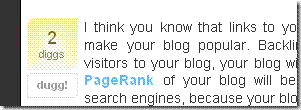 If you
 want to add a Digg Button to your Post , then follow the simple Steps as Given Below.
For Example .. A screenshot of my friends blog
For Example .. A screenshot of my friends blog
- First log into your Blogger Dashboard.
- Go to layout.
- Then Click Edit HTML.
- Mark ‘Expand Widget Temlates‘ .
- Now search for the following code… <p><data:post.body/></p>
- Now place the following Code just Above (before) <p><data:post.body/></p>
- Now Save your Template.
<div style=’float:right; margin-left:10px;’>
<script type=’text/javascript’>
digg_url = ‘<data:post.url/>’;
digg_window = ‘new’;
</script>
<script src=’http://digg.com/tools/diggthis.js’ type=’text/javascript’/>
</div>
Enjoy !! ..
Use The Comment Box below if you have Any Queries.
Subscribe to:
Posts (Atom)


