How to embed Google wave in blogger as widget?Image based tutorial
Step[1]Create a wave in your wave client by clicking on new wave button.
Have you ever tried to insert javascript ad code directly into your Blogger Template and it just wouldn’t work? Ok, everyone in the room can put their hands down now. This has always been a huge problem for blog authors using Google Blogger looking to monetize their site since almost all ad code contains javascript.
So why is this so darn difficult to do? The problem in the past was that Blogger users wanted more control over where and how frequently their block of ad code (usually AdSense) appeared. The Blogger Team listened to their customers and created an easy to use feature that allows you to setup AdSense in your individual posts with a simple checkbox selection.
Stript add,how to make this stript to add functionality in blogger like navbar is showed at top in bloggers.You must have seen these stripe adds in many bloggers nowadays,as i when started blogging used to see that stripe add in johnchow blog and he use to sell that add for hundreds of dollars.This add will be shown at top of every page and is fixed add as we scroll it remains at same place.(See in 99blogger.com)Well I started blogging around three years ago using blogger and it turned out to be quite interesting experience. In my view, the best way to improve your blog is to see what other are doing?
So I started observing some very nicely formatted blogs and noticed what kind of hacks and modification they use for successful blogging and tried to implement them in my own template. Voila! After hours of research and browsing, I have made a list of all hacks which are must have for a professional blog.
It is important to backup your Blogger template (especially before attempting any template customizations). Download a copy of your template to your computer, which you can access in the future if you need to restore your theme (or your entire blog).
For Blogger XML based templates (Layouts):
Go to Layout > Edit HTML in your Blogger dashboard, then click on the link near the top of the page which says “Download Full Template”. This will save a copy of your full template as an XML file to your computer.
Now lets go for some best Blogger hacks…

This hacks gives your blog a professional look by shrinking your full post to few lines and displaying a read more or continue reading link. In many ways this hack is unique. It increases your page impressions and it also helps your blog to load quickly by just loading summaries instead of full posts. This hack has many variations. Many bloggers have modified it in their own way. Let’s see some good variations…
Ramani on hackosphere was one of first who promoted this hack. In this version of hack, it uses insertion of codes around various location of your template. This hack is good for people who use a simple template with many hacks.
One drawback is: your have to edit each of your earlier post and insert codes between them to apply this hack uniformly.
The problem with this is if you use other hacks it may get disturbed which may result in the read more link disappearing or sometimes appearing after post.Codes for this hack are linked below
I used Ramani’s hacks for quite a time which required editing around the <post:data.body/> section. It created some problems for me so I found this variation.
Amanda on bloggerbuster offers a better version of this hack. This is better in many ways. You can use (install) it easily and after installing you don’t have to add separate code between and at end of posts. This automatically shrinks your post and adds read more link. Have a look at codes you need to add…
<b:if cond='data:blog.pageType != "item"'>
<div class='excerpt post-body entry-content'>
<data:post.body/>
<div style='clear: both;'/> <!-- clear for photos floats -->
</div>
<b:else/>
<div class='post-body entry-content'>
<data:post.body/>
<div style='clear: both;'/> <!-- clear for photos floats -->
</div>
</b:if>
This is the best hack for expandable post summaries and it is also hassle free.
This is really a simple and useful widget. It adds a paged navigation at the end of your posts. Nice way to increase your page impression and it also give option to reader to visit more of your posts in random order.
Thanks to Rias he managed to make this hack as an widget so you can add it to your blog without any hassles. This is so perfect that no variation is needed for this one. Still if you want one, you can check this one posted on Devils Workshop by Arjun.
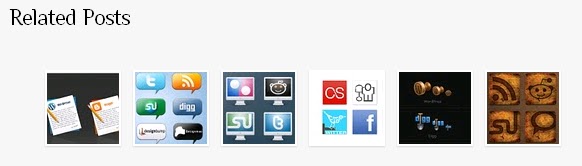
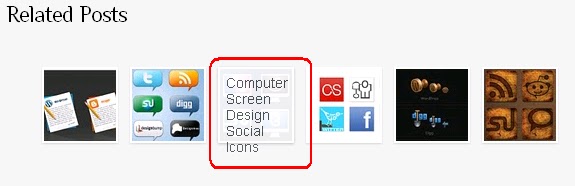
This is very useful and productive hack. It adds a list of related posts after your post content. This is the best way to make your visitor spend more time on your blog without annoying them at all. It also increases impressions and earnings. Also as a visitor spend more time on your blog, he is more likely to subscribe to your RSS feed.
Rias again offers a way to do this but his method is quite complex but offers flexibility. You can try it but it involves lot of editing. Good for bloggers who are comfortable with codes!
This is more comfortable way to install this hack on your blogger template. In this version, you need to put a section of code around <post.data:body/> section and its done!
Its a very easy to use and credit goes to Jackbook for this version of hack.
Social bookmarking services are a great way to drive more visitor to your blog and find many potential readers. Services like Digg, Stumble upon, Technorati has helped many bloggers succeed. There are methods which allows you put a set of icons that link to popular social bookmarking services.
Well this hack is designed by Annesh and Beautiful beta. This hack is simple to use.
Just a two step process and you can add a set of booking icons that will appears at the end of your each post. You can add/remove social bookmarking icons that as per your choice.
Rahul created this hack when he was on Blogger. This supports around 30 top social boomarking services and also provide option to add all of them once or one-by-one.
Using AdSense after each post is best way to increase your AdSense revenue. It helps in getting more clicks on ads. I used Rahul’s method to do it.
This is good for people who do not use expandable post hack. The problem is, ad appears on home page as well the post pages. Look at screen shot below…
If you are using expandable post hack then it doesn’t look good to show ads on homepage. You can avoid this by adding two lines of code around codes provided in Rahul’s post…
<b:if cond='data:blog.pageType == "item"'>
"Modified Google AdSense Ad Code"
</b:if>
The above lines add a condition which prevent this hack frrom working on homepage, label(category) or archive pages. Look at following screenshot for some help…
That’s All! If you have any really good hack, please share via comments!
Thanks for reading…
Navigation Links in Blogger are visible as text links usually at the bottom of each page. It is always good to have images as links for navigation, simple text links usually do not attract attention but image links accentuate the navigation links.
This hack will show that just by uploading the images and replacing some code in your template, your image navigation links will be up and running.
The new navigation links will look like this:
You can have images other than these for home and post links(newer and older).
Here is a simple hack to replace text in navigation links to images:
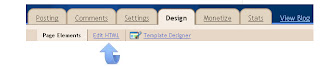
1. Go to Layout->Edit Html
2. Download Full Template (This is to backup your template)
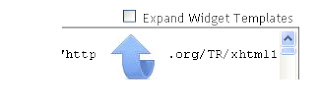
3. Check the Expand Widget Templates
Older Posts
Search for this code
<data:olderPageTitle/> (For Older Posts)
it will look something like this
<a class=’blog-pager-older-link’ expr:href=’data:olderPageUrl’ expr:id=’data:widget.instanceId + "_blog-pager-older-link"’ expr:title=’data:olderPageTitle’><data:olderPageTitle/></a>
Now replace this code with the code below
<img src=’http://bloggertipspro.googlepages.com/older-posts.png’ style=’border:none; background:#FFFFFF;’/>
Newer Posts
search for this code
<data:newerPageTitle/> (For Newer Posts)
Replace it by the code below
<img src=’http://bloggertipspro.googlepages.com/newer-posts.png’ style=’border:none; background:#FFFFFF;’/>
Home Page
For home page you have to replace the codes twice.
Search for this code
<data:homeMsg/> (For Home Page)
Replace it by the code below
<img src=’http://bloggertipspro.googlepages.com/home.png’ style=’border:none; background:#FFFFFF;’/>
You can replace the images by just replacing the http://bloggertipspro.googlepages.com/home.png with your own image link location
4. Save the Template
As a blogger, you know that sometimes the hardest thing to do is come up with content for your blog. Finding ideas for your blog (especially if you want to post regularly) can often lead to you not blogging at all, because you start hitting the wall when it comes to what to blog about. So I thought it might be useful to offer up 25 ways to use the web to find content for your blog. Here they are.
1. Using a plug-in like CommentLuv allows your commenter to share their most recent post. I’ve seen blog titles that have intrigued me and clicked through to read, and given me an idea for a post of my own. We use CommentLuv on For Bloggers By Bloggers.
2. If you see a comment that really resonates and offers a great viewpoint, ask the poster if they’d like to guest for you and expand on the original comment.
3. Similar to above, if you see a comment you disagree with, expand your own view into a post and offer reasons why your viewpoint is different.
4. As #1 points out, CommentLuv is great for sharing the most recent post of a blogger, but not every blog uses it. So click through the URL of someone’s comment and see what they’re writing about, to see if you can gather ideas from there.
5. Blogrolls. While some have called blogrolls out of date, many bloggers still use them to share what they’re reading. Visit the blogs of those your favourite blogger reads, and see what ideas you can get from them.
6. A lot of bloggers have category lists for Top 10 Tips and popular posts in their navigation menu. Have a look and see what’s there, and use them to build your own content from.
7. Speaking of popular posts, if a blogger has their most popular posts on display in their sidebar, click on a couple to read and see what made them popular. Then see how you can take inspiration from them.
8. Delicious is a great resource for finding blog content. Just type your topic into the Delicious search bar and you’ll find a ton of results from people that have saved articles or blog posts about your chosen topic.
9. Stumbleupon is a cool browser add-on that lets you browse websites at random. You can land on some great content that will give you your own ideas for your blog.
10. While not as popular as it used to be, Digg still has some great shared posts and news on its site. Look at the most popular and see what take you can offer.
11. BizSugar is becoming more popular, as it concentrates on small business news. If your blog is in this niche, you can get some great ideas from here.
12. A mix of social bookmarking and community, Blog Engage is similar to Digg and BizSugar with its voting system, but it focuses a lot on just bloggers and is a great starting point for ideas.
13. One of my favourite blog communities is Scribnia. You can find authors and bloggers based on niches, and this can really help you target content to get inspiration from.
14. Alltop offers a great collection of blogs in a veritable feast of topics – if you can’t find something to write about there, then I’m stuck!
15. Still viewed by many as the Blogger’s Bible, Technorati has more than 133 million blogs registered with them. Use the categories or top topics to find content you can get ideas from.
16. Google Blog Search offers up a huge resource of blogs on every topic under the sun. Much like Alltop and Technorati, use the topic search to find your interests.
17. Another resource from Google is their Trends platform. If you’re quick off the mark, you can write a blog post about a trending topic, optimize it for SEO, and (hopefully) be found by those looking at the trends for that moment.
18. Junta 42 offers some great tips on content marketing – check out their articles for ways to get ideas for your own blog.
19. If you’re on Twitter, one of the best ways to find content for your blog is to jump into the weekly #blogchat discussion. Great bloggers, great topics – what more do you need?
20. Sticking with Twitter, have a look at what’s trending at any time on that platform then see if you can get a post out about it (just don’t go all spammy with your hashtags when your post is ready). Trendsmap is a great resource for global trends.
21. And yet again with Twitter, Twitter Search is great for finding out what people are saying regarding the stuff you blog about – type in a keyword, and see if any conversations inspire you to expand on them in a blog post.
22. On Facebook there’s a great app called Networked Blogs, that shares content from Facebook users with blogs, and the Networked Blogs directory. You can get a widget with different blogs in it, and use this to build some ideas for your own content.
23. LinkedIn Groups are perfect for finding blog content. Look at the questions being asked on there and write a blog post as your answer.
24. Seen by many as a place for file and document sharing, Slideshare has great presentations that are just chock full of ideas for you to take away and build several blog posts from.
25. YouTube is more than just a video upload site – think about grabbing a tips video, for example, embedding it into a blog post and then riffing on what else could have been added to the video to make it a better resource.
There are many people who consider that Blogger is a much stable platform than WordPress, that’s why many people are using Blogger as a blog solution. My opinion is that both are great platforms but I do prefer self hosted WordPress because is fully customizable and also you can do whatever you want.
This list will help you to transform your Blogger blog in that type of blog that you like.
This is probably one of the most annoying thing that Blogger has. This hack will help you to remove the Blogger bar forever.
2. Add a Tag Cloud (Label Cloud)
This is one important hack that will help you to create a label cloud. Is working like every wordpress tag cloud. This hack was created by phydeaux3.
3. How to Hide/Remove Label Count in Blogger Blogs
When you have a new blog is pretty embarrassing to let people know that you have just few posts. This hack will help you to hide this.
4. Random Header Background Image
Changes the background image of your blog header. It will automatically display a different background image for your header.
Add caption footer to images in posts.
6. Tabs
Add customized dynamic tabs with content. Add posts or comments or even tag cloud using this cool hack.
Blogger has not officially introduced the plugin for recent comments. This will help you to display latest comments on posts. Is actually exactly like the Recent Comment plugin for WordPress.
8. Emoticons
Converts the specific symbols for emoticons in graphic emoticons.
Add special list in the footer or in the top of your posts. This will help you and your visitors to automatically submit articles to social websites and share them with friends.
10. Ajax Menu
Adds a cool AJAX menu for labels which has pretty cool effects.
11. Read More Option
Adds the read me text on the first page and posts only a preview of the actual post.
A widget that helps you to display random articles.
13. Expandable post summaries for professional blog design
This is another version of read more hack.
14. Replace Date with a cool new calendar type layout in blogger
This hack will help you to replace the old fashion date with a new cool graphical one.
15. Drop Down Labels
Build a cool DHTML menu for your labels.
This is actually a hack created as a clone of the WordPress plugin SexyBookmarks. You can see how it works here at the end of the post.
17. Replace Home and Post Links with images
Use images instead of numerical and symbol system.


]]></b:skin>Step 3. Copy and paste the following code Directly Above / Before ]]></b:skin>
<!--start related posts css Info : http://www.99blogger.com-->Step 4. Find the following piece of code in your blogs Html : (Click Ctrl and F for a search bar to help find the code -)
ul#related-posts{
font-family:"Droid Sans",Helvetica,Arial,sans-serif;
font-size:10px;
list-style: none;
margin: 20px 0;
padding: 0;
text-transform: none;
}
ul#related-posts li{
float: left;
height: auto;
margin:0 5px;
padding: 2px 1px 2px;
list-style-type:none;
}
*html ul.rp#related-posts li{
margin:0 13px;
}
ul#related-posts li a {
-moz-box-shadow: 0 1px 2px rgba(0, 0, 0, 0.15);
border: 2px solid #FFFFFF;
display: block;
height: 72px;
position: relative;
width: 72px;
}
ul#related-posts li a {
color: #474C51;
text-decoration: none;
text-shadow: 0 1px 0 #FFFFFF;
}
ul#related-posts li .overlay {
height: 66px;
line-height: 16px;
padding:6px 0 0 6px;
position: absolute;
width: 66px;
z-index: 10;
}
ul#related-posts li .overlay {
}
ul#related-posts li a:hover .overlay {
background: #fff;
display: block !important;
opacity:0.9;
}
ul#related-posts li img {
bottom: 0;
padding:0px !important;
}
ul#related-posts li a:hover {
-moz-box-shadow: 0 1px 3px rgba(0, 0, 0, 0.25);
}
<!--end related posts css.Info : http://www.99blogger.com-->
<div class='post-footer'>Step 5. Copy and paste the following code Directly Below / Under <div class='post-footer'>
<!--start related posts code Info : http://www.99blogger.com-->Optional Changes
<b:if cond='data:blog.pageType == "item"'><h3>Related Posts</h3>
<script type='text/javascript'>
var defaultnoimage="https://blogger.googleusercontent.com/img/b/R29vZ2xl/AVvXsEiXYH4VSSPiRfBD4HMJh_9Y9J1yQfhHJD1yX1bhqbMzW4L3HLRsFqbCFfwdwJe8W7M_v6vqp2ZtlnYB1rNQamIxVZ_E62aK6rH37nVDabb-RZFLdITLqnR0Q0R_gLywYzblOZEYeYn2lhk/s1600/no-image.gif";
var maxresults=6;
</script>
<script src='http://spiceupyourblogextras.googlecode.com/files/hover-related-posts.js' type='text/javascript'/>
<b:loop values='data:post.labels' var='label'>
<b:if cond='data:label.isLast != "true"'>
</b:if>
<script expr:src='"/feeds/posts/default/-/" + data:label.name + "?alt=json-in-script&callback=related_results_labels_thumbs&max-results=6"' type='text/javascript'/>
</b:loop>
<script type='text/javascript'>
removeRelatedDuplicates_thumbs();
printRelatedLabels_thumbs("<data:post.url/>");
</script>
</b:if><div style='clear:both'/>
<br/><br/>
<a href='http://www.99blogger.com'><img alt='Best Blogger Tips' src='http://3.bp.bloodspot.com/_rKG-ziTSNUQ/TQ5eV0U0EiI/AAAAAAAACik/xo2eFaDbfrE/s1600/best+blogger+tips.png'/></a>
<!--end related posts code Info : http://www.99blogger.com--->

judge a book by its cover is such a trite adage. While there’s merit to it, most people—especially in the blogosphere—don’t heed it. An ugly blog with scrunched up images and missing links aren’t going to get awards. Similarly, readers who come across boring blog post titles will say, “Meh,” and go back to Facebook. Like it or not, your post title is your book cover, and unless it’s made of gold, your post will go unread, unappreciated, unloved.Make sure your posts get the love they deserve by giving it an appropriate title.
Every time you write a post on your blog you have the option to add some Labels to that post.While most Bloggers don't give much thought to the labels they use and some don't add any labels at all they can be very beneficial to your blog in a number of ways, but only if used correctly.Using labels in the correct manner can help your blogs performance in Search, leading to more traffic and labels can be a great way for visitors to navigate your blog keeping them browsing through your archive.So by simply following a few rules and putting some thought into the labels you select you can get more traffic to your blog and increased page views from that traffic.![]() |
| BestBloggerTemplates.Net Labels |
If you ask a blogger if he or she blogs for fun or money, it’s likely you won’t get a proper answer. This is because, other than the professional bloggers who are out promoting products or services, most people blog for fun hoping to earn money in the process. Why do you blog? For fun or money?2008-11 99B-Photoshop Addons Downloads,Styles,Gradients,Blogging, Webmasters Resources. Articles cannot be reproduced without permission from the author.& domain by BigRock